Description
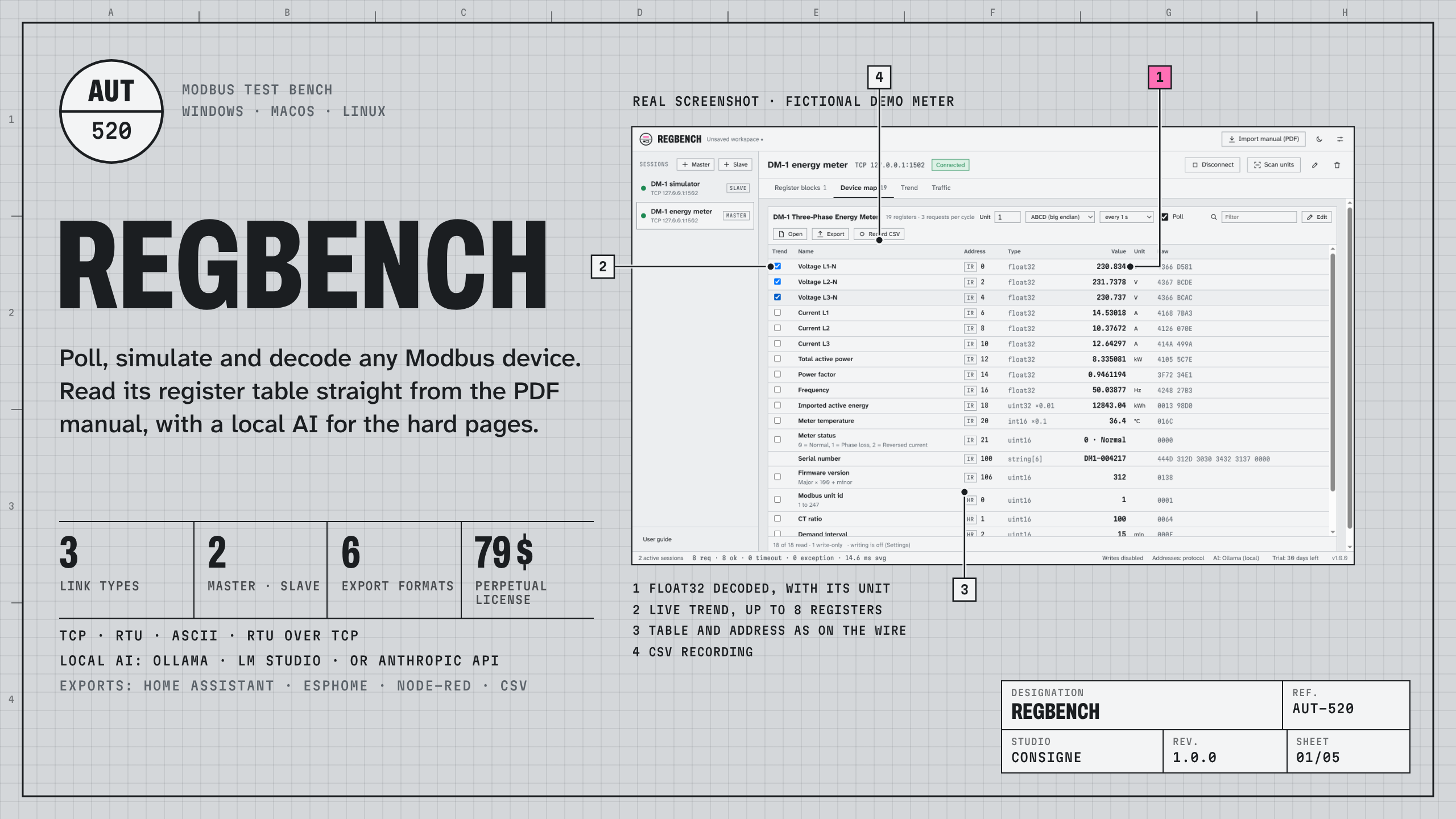
Regbench is a Modbus test bench for automation engineers, integrators and developers. Connect to a device, see every register decoded with its name, unit and scale, write values safely, simulate a device that is not there yet, and stop typing register tables by hand.
Talk to any Modbus device
- Modbus TCP, RTU and ASCII on serial ports, and RTU over TCP for serial-to-Ethernet converters.
- Register blocks for functions 01 to 04, up to 125 registers or 2000 bits per request, refreshed from 100 ms to 10 s.
- 14 formats per row: 16, 32 and 64-bit integers and floats, BCD, strings, bit fields, in the four word orders (ABCD, CDAB, BADC, DCBA).
- Timeouts, retries, turnaround delay, removal of the echo some RS-485 adapters send back, and an "always use function 15/16" switch for devices that refuse single writes.
- Scan units finds the unit ids that answer on a bus.
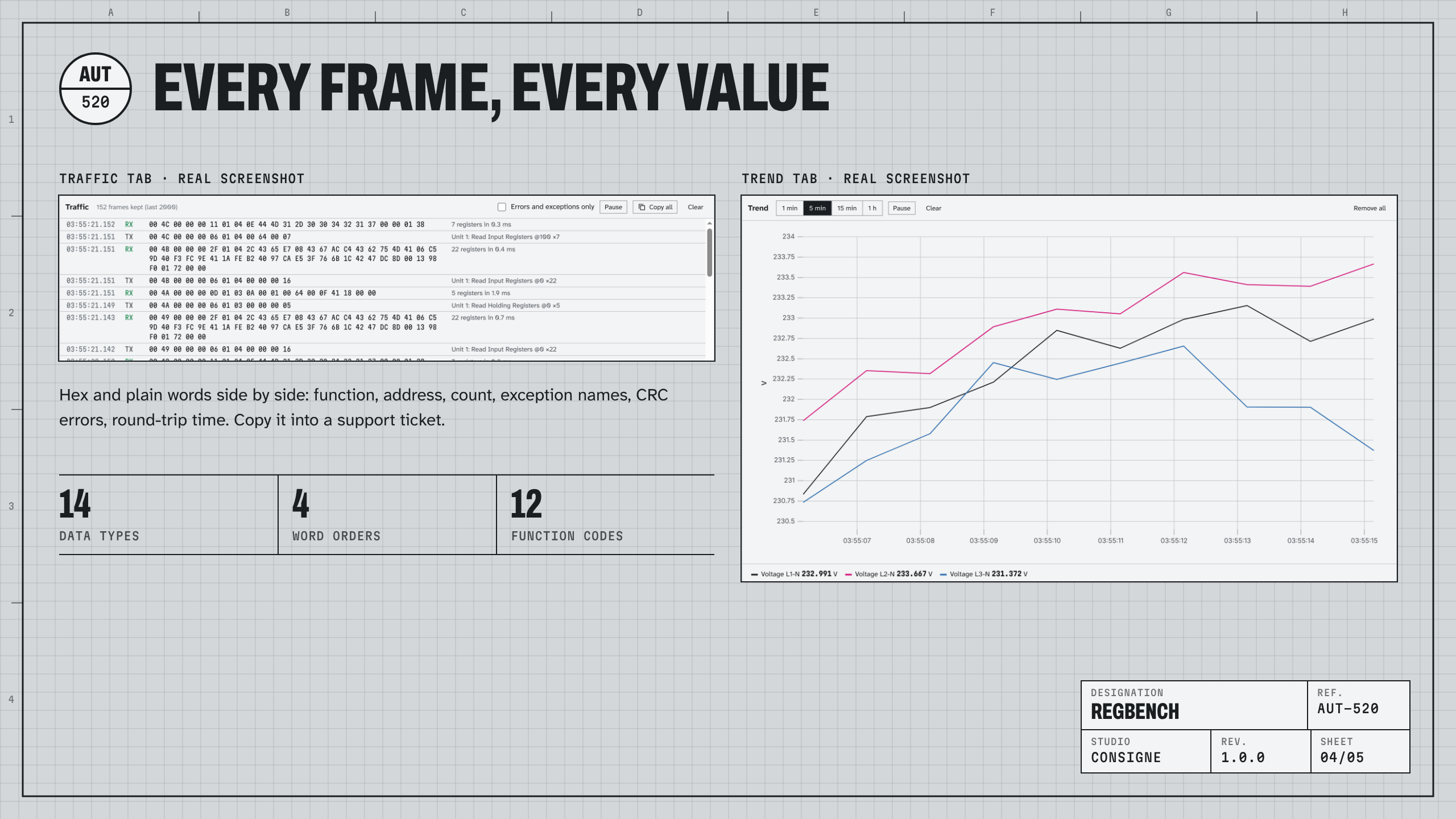
- Traffic shows every frame in hexadecimal and in plain words (function, address, count, exception names, CRC errors, round-trip time), ready to copy into a ticket.
Work with names, not addresses
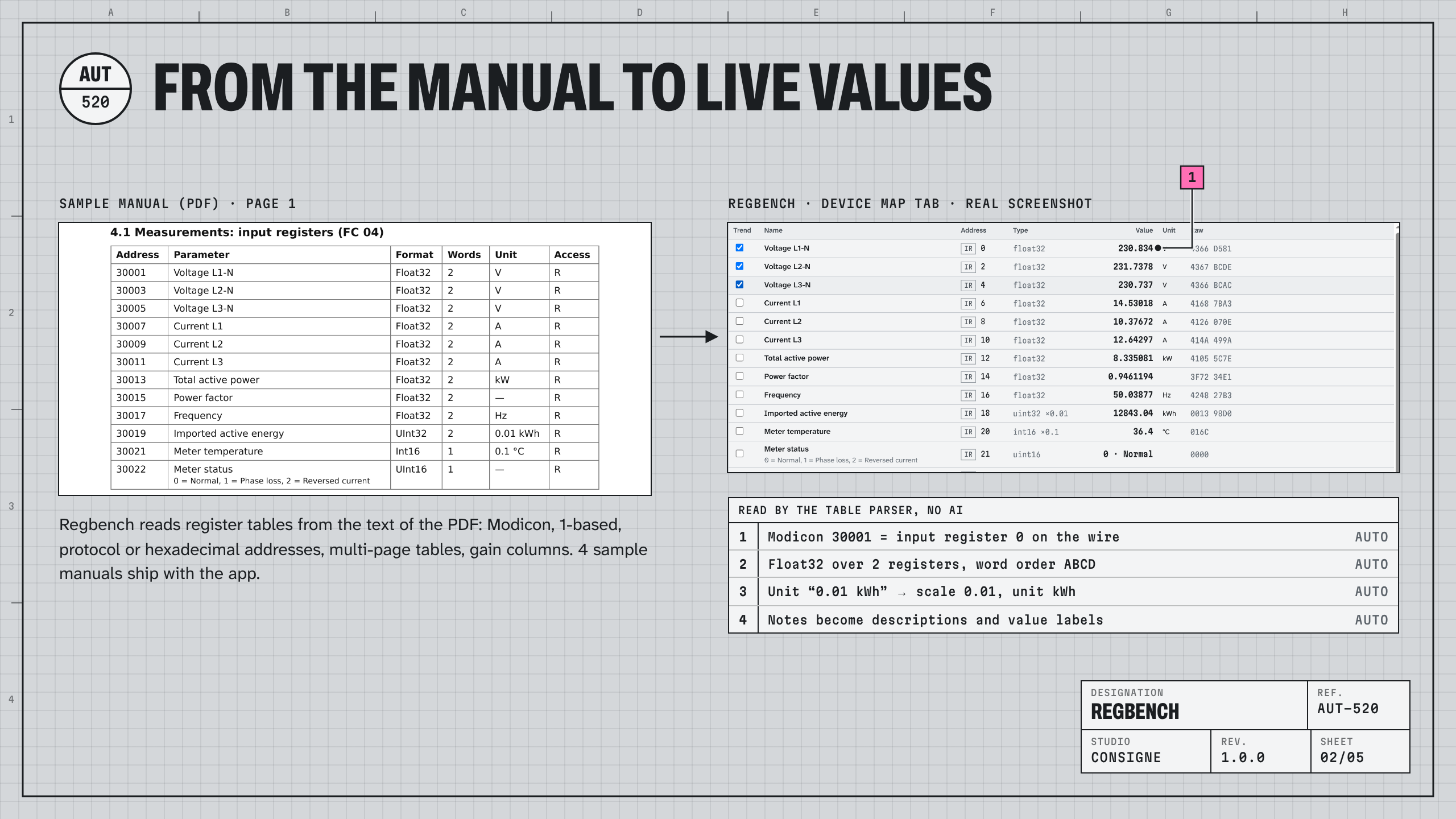
- A device map gives each register its name, unit, scale and value labels (
0 · Normal). Regbench groups the map into as few requests as possible, and reads register by register a device that refuses grouped reads. - Trend up to 8 registers live, record every value to CSV for an overnight test.
- Writes (functions 05, 06, 15, 16) stay off until you enable them, and every write shows the exact frame before it is sent.
Read the manual for you
- Drop the device's PDF manual: Regbench reads its register tables from the text of the PDF. Modicon references (40001), 1-based numbers, protocol or hexadecimal addresses, tables over several pages, two-line headers, gain columns, function-code columns, enumerations. No AI needed for that, and nothing leaves your computer.
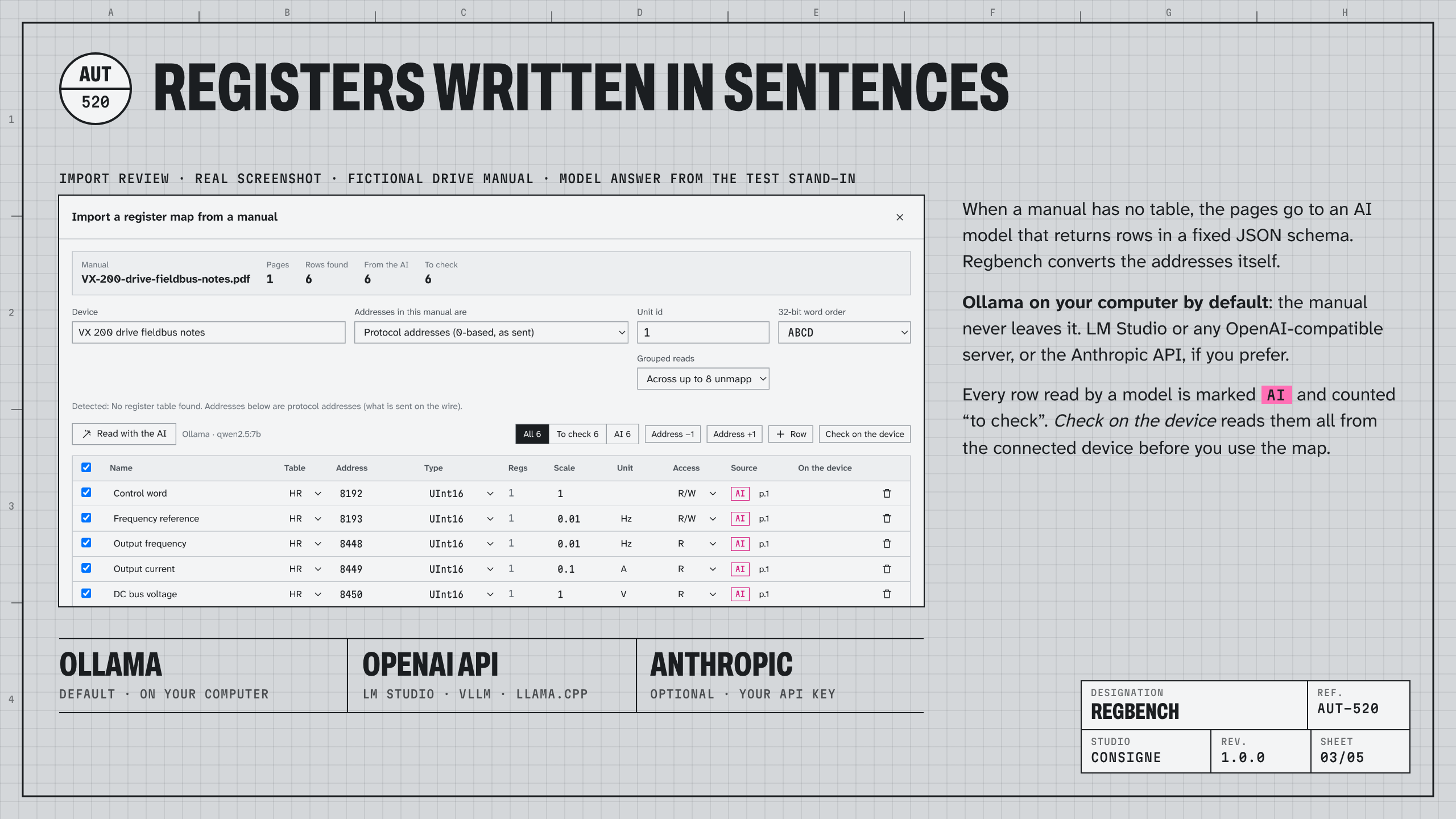
- Manuals that describe registers in sentences go to an AI model: Ollama on your own computer by default, LM Studio or any OpenAI-compatible server, or the Anthropic API with your key. Rows read by a model are marked and counted "to check".
- Check on the device reads every row from the connected device before you accept the map, so a wrong address or word order shows at once.
Simulate a device
- A slave over TCP or serial, with your map, and values that follow a sine, a ramp, a random walk, a counter or a toggle. Test a SCADA, a PLC program or a gateway before the hardware arrives.
- Strict addressing (exception 02 outside the map, like real devices), a response delay, and answers to unit 255 over TCP.
Export the map
Home Assistant (modbus: YAML), ESPHome (modbus_controller), Node-RED (node-red-contrib-modbus flow with a decoder), CSV, Markdown documentation, and Regbench JSON to share with a colleague.
Try it first
The app ships with a demo energy meter (one click: a simulated device and a session connected to it) and four sample manuals in different styles. Every feature is available for 30 days.
License
- Single (79 US$): one person, 2 computers (for example a desk computer and a commissioning laptop). Team (249 US$): 5 people of the same company, 10 computers.
- Perpetual: every 1.x update included; the versions you received keep working forever.
- Activation with the key from your receipt. Computers without network are activated with a file prepared on a connected computer.
- Support by email, answers within two working days, in English or French.
What Regbench does not do
- It does not sniff a bus between two other devices: it sees the traffic it sends and receives.
- It does not read scanned manuals (images): run OCR first.
- It is not a safety tool and must never be used as one.
System requirements
Windows 10 or 11 (64-bit), macOS 12 or later (Apple silicon or Intel), Linux x64 (AppImage, or .deb for Debian and Ubuntu). For the local AI import: Ollama and about 5 GB of free memory for the default model.
Transparency
The demo meter, the sample manuals and every device in the screenshots are fictional. In the "registers written in sentences" picture, the model answer comes from the test stand-in used by our automated tests. The 1.0 installers are not code-signed yet: Windows SmartScreen and macOS Gatekeeper ask for a confirmation the first time (steps in the FAQ).
FAQ
Does it need internet? No. The license is checked with Gumroad once at activation and about once a week after that (a failed check changes nothing). The AI import uses the network only if you choose a remote AI service.
Windows says "Windows protected your PC". macOS says the app cannot be checked. The 1.0 builds are not signed with a publisher certificate yet. Windows: "More info", then "Run anyway" (a portable zip is also provided). macOS: right-click the app, "Open", then "Open"; on macOS 15, System Settings › Privacy & Security › "Open Anyway". SHA-256 checksums are provided for every file.
Which USB to RS-485 adapters work? Any adapter your system sees as a serial port (FTDI, CH340, CP210x, Moxa, Advantech…). If yours echoes what it sends, tick one box and Regbench removes the echo.
Is my manual sent to an AI? Only if you click "Ask the AI", and only to the service you set up. With Ollama or LM Studio on your computer or network, nothing leaves it. The table reader works entirely on your computer.
How accurate is the PDF import? On manuals with real tables, the reader finds the registers, types, scales and units directly; you review every row, and "Check on the device" confirms them against the live device. The four sample manuals ship with the app so you can see it on different layouts before you try your own.
Can I move my license to a new computer? Yes: activate the new one with the same key. A Single key accepts 6 activations and a Team key 30, so replacing or reinstalling a computer has room; activating again a computer already activated costs nothing. When the activations are used up, write to support with your receipt and we reset the counter.
Do I need an invoice? Your Gumroad receipt lets you generate an invoice in your company's name. For a purchase order or supplier registration, write to support.
Questions, a device that does not import well? Write to support@consignestudio.fr with the manual if you can share it: difficult manuals are how the reader improves.
Refund? 14 days, no questions asked.